What’s New in IFH: Inventory Forecasting Hero — Q2 2026
A lot of what we shipped this quarter came directly from merchant requests. Some of you needed better ways to slice the forecast report. Some of you were looking to replace features you relied on in Stocky before Shopify sunsets it in August. And some of you wanted to close the loop between your forecast and what customers actually see on your product pages.
Here’s everything we shipped in Q2, plus a look at what’s coming next month for holiday planning season.
Display Expected Arrival Dates on Your Product Pages
When a product variant is out of stock, customers have one question: when is it coming back?
IFH: Inventory Forecasting Hero can now display the expected arrival date directly on the product page — pulled in real time from the in-transit transfer for that product in Shopify. No manual updates, no guessing. When the date changes in your transfer, it updates on the storefront automatically.

This does a few things at once. It reduces the volume of “when will this be back in stock?” messages to your support team. It sets clear expectations for customers who are already interested in the product. And it pairs naturally with a back-in-stock alert app or a backorder/pre-order setup — customers see the date and can decide whether to wait or sign up for a notification.
Getting Ready for the Stocky Sunset
Shopify is shutting down Stocky on August 31, 2026. If you’ve been using it for purchase orders, reorder suggestions, or tracking incoming inventory, you need to migrate before then.
IFH: Inventory Forecasting Hero is fully ready for the new Shopify PO and transfers workflow — including the changes Shopify made to how incoming inventory is tracked. Here’s what that means in practice:
Create a Shopify Purchase Order directly from IFH: Inventory Forecasting Hero. Select the products you want to reorder from your forecast report, and the app generates a ready-to-upload CSV in Shopify’s import format. No reformatting needed.
In-transit transfers sync automatically. Once you’ve created a transfer and moved it to In Transit in Shopify, IFH: Inventory Forecasting Hero picks it up and factors that incoming stock into your reorder quantity suggestions. So if 50 units are already on their way, the app won’t tell you to order another 50.
If you’re not familiar with Shopify’s new PO and transfer workflow, we wrote a full walkthrough here: Shopify Changed How Purchase Orders Work. Here’s the New Workflow.
Filter the Forecast Report by Tags
You can now search and filter your Forecast Report using Shopify product tags.
Two ways to use this:
Include by tag. Search for products tagged “Summer Sale” or “Holiday” to see only those SKUs in your forecast. Useful when you’re planning a specific collection or campaign and don’t want every product cluttering the view.
Exclude by tag. Filter out products tagged “Discontinued” or “Clearance” so they don’t take up space in your reorder planning. If you’re not going to reorder it, there’s no point forecasting it.
Filter the Forecast Report by Location
If you run multiple inventory locations in Shopify, you can now filter the Forecast Report to show inventory from a specific location.
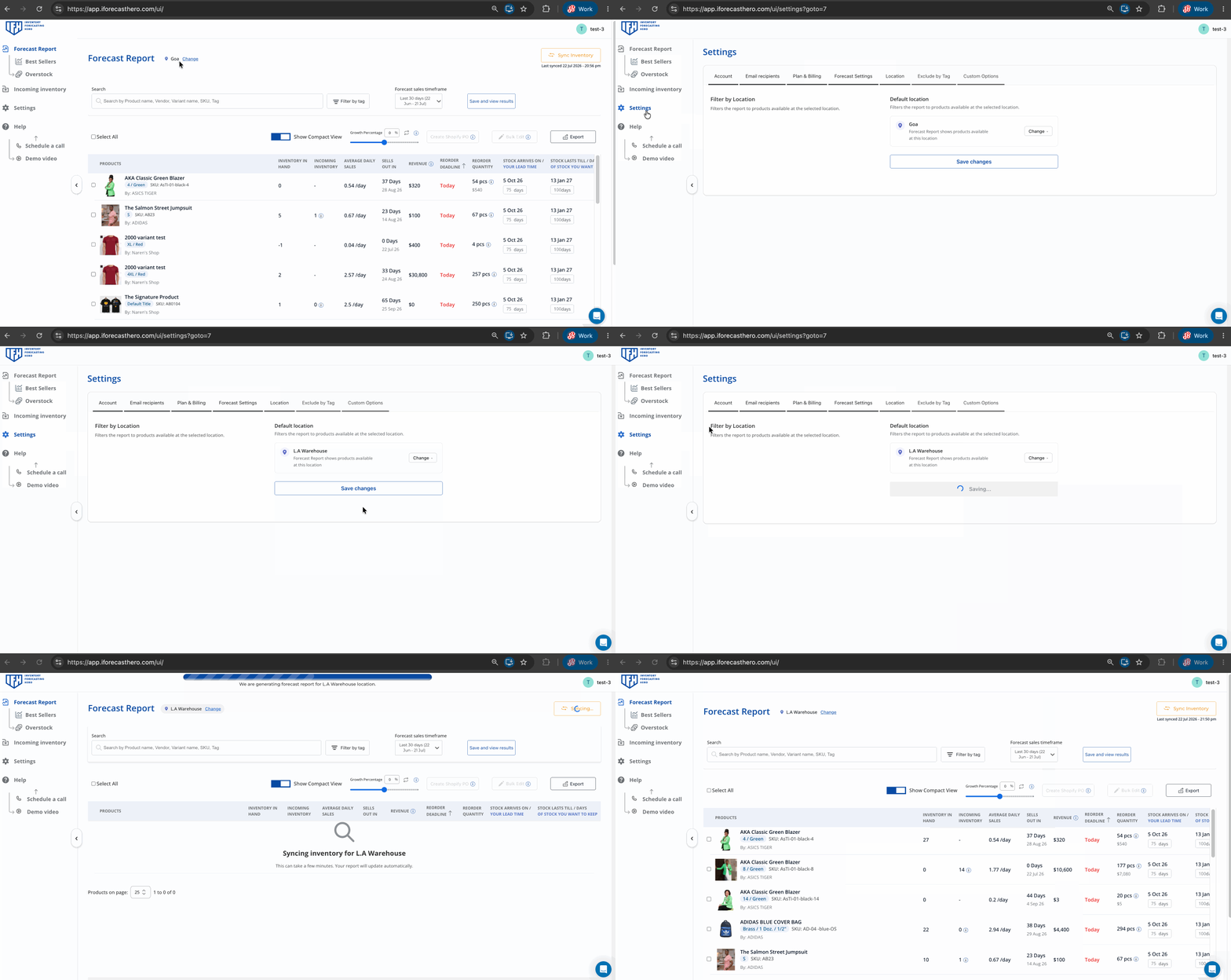
A few situations where this is useful:
- You store certain product lines in a separate warehouse and want to see their reorder needs independently.
- You’re dropshipping from a third-party location and transitioning to fulfilling from your own warehouse. You want to plan the transition without mixing the two together.
- You have a location that’s running low while another is overstocked, and you want to see the picture clearly before making a purchasing decision.
One thing to note: the filter uses current inventory at the selected location. But the daily sales average still counts all orders for that product across all locations — not just the ones fulfilled from that location. This is not a full forecast-by-fulfillment-location feature. It’s a view filter to help you focus, not a separate forecast engine per location. We wanted to be upfront about that.
Sells Out In: Now Accounts for Incoming Inventory
The Forecast Report used to show a “Restock Needed In Days” column — but this confused some merchants.
We’ve simplified this and added a “Sells Out In” column which calculates the first date your stock will actually hit zero, taking into account any in-transit inventory arriving before that date. So if you have 10 units left selling at 1 per day, but 20 units arriving in 5 days, the column correctly shows that you won’t stock out at all.
Coming Next Month: Holiday Planning
BFCM planning season is right around the corner. Here’s what we’re shipping in August to help you get your inventory right for the holidays:
AI chatbot for BFCM planning. Ask questions about your inventory in plain language and get answers grounded in your actual Shopify data. Which products are at risk of stocking out before December? What should you order now given your current lead times? We’ll have more details on this soon.
Exclude tagged orders from forecast logic. If you ran a flash sale or a deep discount promotion that spiked your sales numbers, those spikes can throw off your daily average and inflate your reorder quantities. You’ll be able to tag those orders and exclude them from the forecast calculation so your baseline demand stays accurate.
Exclude blackout dates. Similar to above but at the product level. If a product was on pre-order or backorder for a period, the sales during that window don’t reflect normal demand. You’ll be able to mark those dates and exclude them from the sales average.
Exclude out-of-stock days. This one’s important for accuracy. If a product was out of stock for 2 weeks, your sales average for that product looks artificially low — because the sales simply couldn’t happen. Excluding those days gives you a truer picture of actual demand, which leads to better reorder quantities going into the holiday season.
All of these features are available now for IFH: Inventory Forecasting Hero merchants. If you have questions about any of them or want help setting something up for your specific workflow, reach out to the team — we’re happy to work through it with you.
Inventory Forecasting Hero does this automatically for your Shopify store. $25/month with a 30-day free trial.
Start Free Trial →