Meet Sam: Your AI Inventory Advisor for Black Friday & Cyber Monday
It is that time of the year to start thinking about holiday inventory. But this year is different — we’ve been working on something that we’ve honestly wanted to build for a long time.
IFH: Inventory Forecasting Hero was built with one goal: give small Shopify merchants an affordable and accurate way to plan their inventory. Over the years, one of the most common requests we got was help with situations that were specific to each merchant — end-of-season sales, long lead times from overseas suppliers, BFCM planning. We’d get on calls, share ideas, walk through strategies. But after the call, the merchant still had to go execute the plan on their own.
We always imagined a way to give merchants an expert by their side at the moment they needed it most. Not a report to read later. An actual conversation — at 11pm on a Sunday when you’re staring at a purchase order that needs to go out Monday morning and you’re not sure if the numbers are right.
With AI, that’s finally possible. Meet Sam.
How Merchants Usually Plan for BFCM
Let’s be honest about how this actually works today for most small stores.
If the budget allows, merchants hire a trained inventory planner — a few thousand dollars for a deep dive into last year’s BFCM performance and this year’s expectations. They get a clear playbook to execute. It’s worth it. The cost savings from not overstocking and not stocking out more than pay for the planner.
Most small merchants do it themselves. They’re the ones closest to the numbers anyway. But doing it by hand — pulling last year’s data, estimating this year’s growth, accounting for supplier lead times, checking what’s already on order — is where the mistakes creep in. Overstocking a bestseller. Understocking a new launch. Placing the PO too late because the lead time math was off.
What About Just Using Shopify Sidekick or ChatGPT?
Two tools are now genuinely accessible to merchants of all sizes for this kind of planning:
- Shopify Sidekick
- Connecting your Shopify store directly to Claude or ChatGPT
In theory, you can ask them to pull last BFCM’s numbers, identify your bestsellers, plug in this year’s growth expectations, and get an inventory plan. And honestly, the output sounds impressive.
But there are landmines if you trust it blindly.
AI tools jump to conclusions. They’re built to appear helpful immediately — so they give you confident-sounding answers even when they’re missing key inputs. They don’t pause to ask about your lead times, your supplier reliability, your budget constraints, or your available cash.
The data gaps are bigger than they look. Here’s what an AI connected to your Shopify store doesn’t know:
- How many days a product was out of stock during last BFCM. If a product sold out on Day 3 of an 8-day event, the AI sees 3 days of sales and projects forward from that. The real demand was probably 2-3x higher.
- Your supplier lead time. Shopify doesn’t store this. The AI has no idea if your supplier needs 14 days or 60 days to ship.
- When your incoming inventory will actually arrive. It can see a total incoming number, but it won’t simulate your inventory day by day — accounting for an order arriving Oct 15 vs Nov 1 makes a real difference when you’re trying to have stock available by Nov 21.
These aren’t edge cases. They’re the exact numbers that make or break a BFCM inventory plan.
Best of Both Worlds: Meet Sam
We solved both problems — affordability and missing data — the same way.
We found an inventory planner with real D2C retail experience and asked them to walk us through, step by step, how they’d plan BFCM for a Shopify merchant. The actual methodology. How they correct for stockout days. How they apply growth assumptions. How they factor in lead time to set a PO deadline. How they communicate risk when the numbers are uncertain.
Then we built that methodology into Sam — and connected it to all the data that IFH: Inventory Forecasting Hero already has that generic AI tools don’t: supplier lead times, stockout-adjusted sales velocity, incoming inventory broken out by arrival date.
The result: for $29/mo you have an AI inventory advisor who can walk you through your BFCM plan the same way a real planner would — any day, any time.
P.S. Sam is multilingual. If you prefer to chat in French, Spanish, or any other language, go for it.
How Sam Works: Step by Step
Step 1: Choose the products you want to plan for
Select the SKUs you want to include in your BFCM plan from your IFH: Inventory Forecasting Hero forecast report. You can pick your top sellers, a specific collection, or anything you’re worried about.
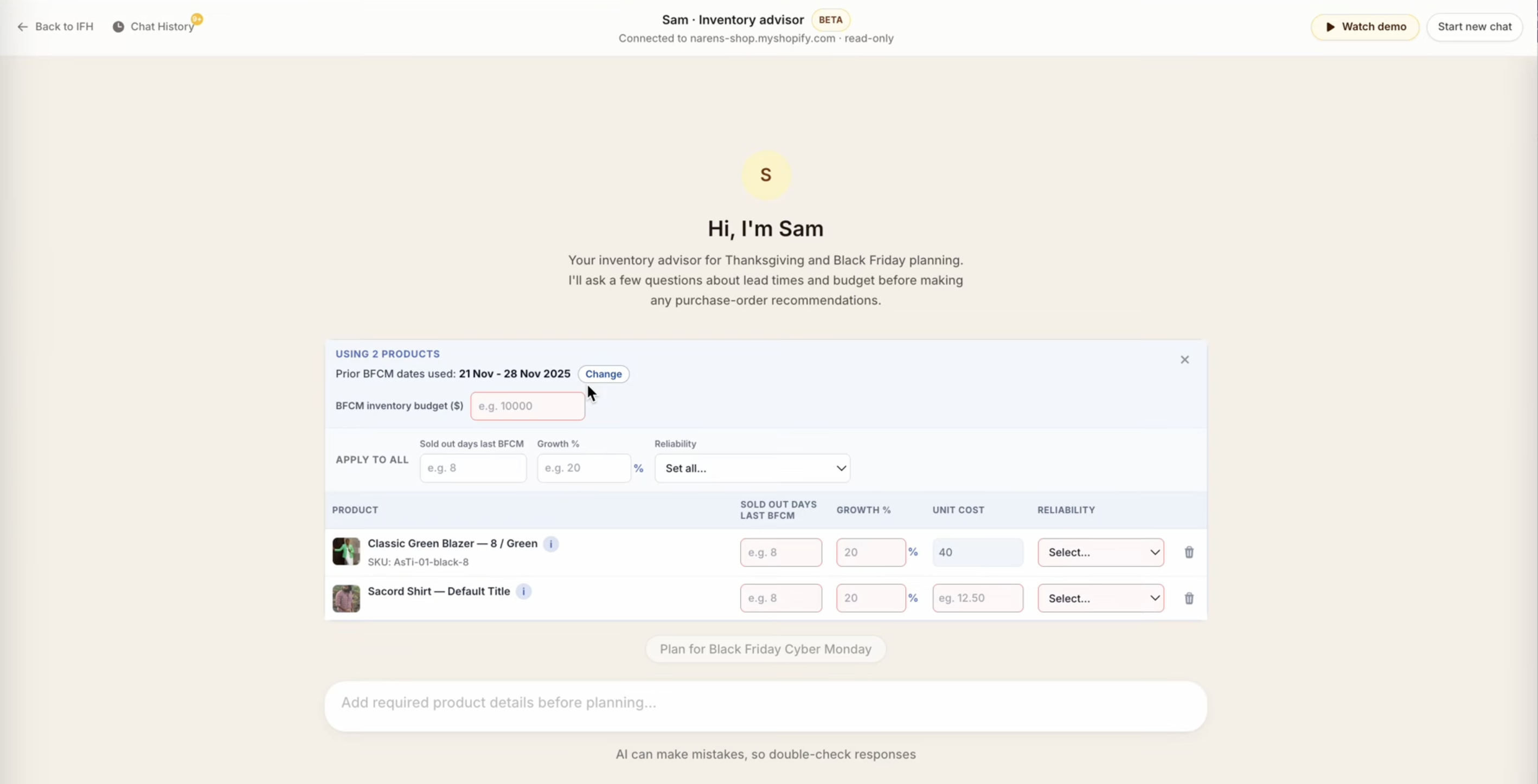
Step 2: Sam loads last year’s BFCM data automatically
When you open Sam, your last BFCM sales data is already there — units sold, current inventory on hand, inventory already on order (broken out by arrival date), your baseline daily sales rate, and your supplier lead time pulled from your IFH settings.
You don’t have to copy-paste anything or hunt through reports. Sam starts with the full picture.
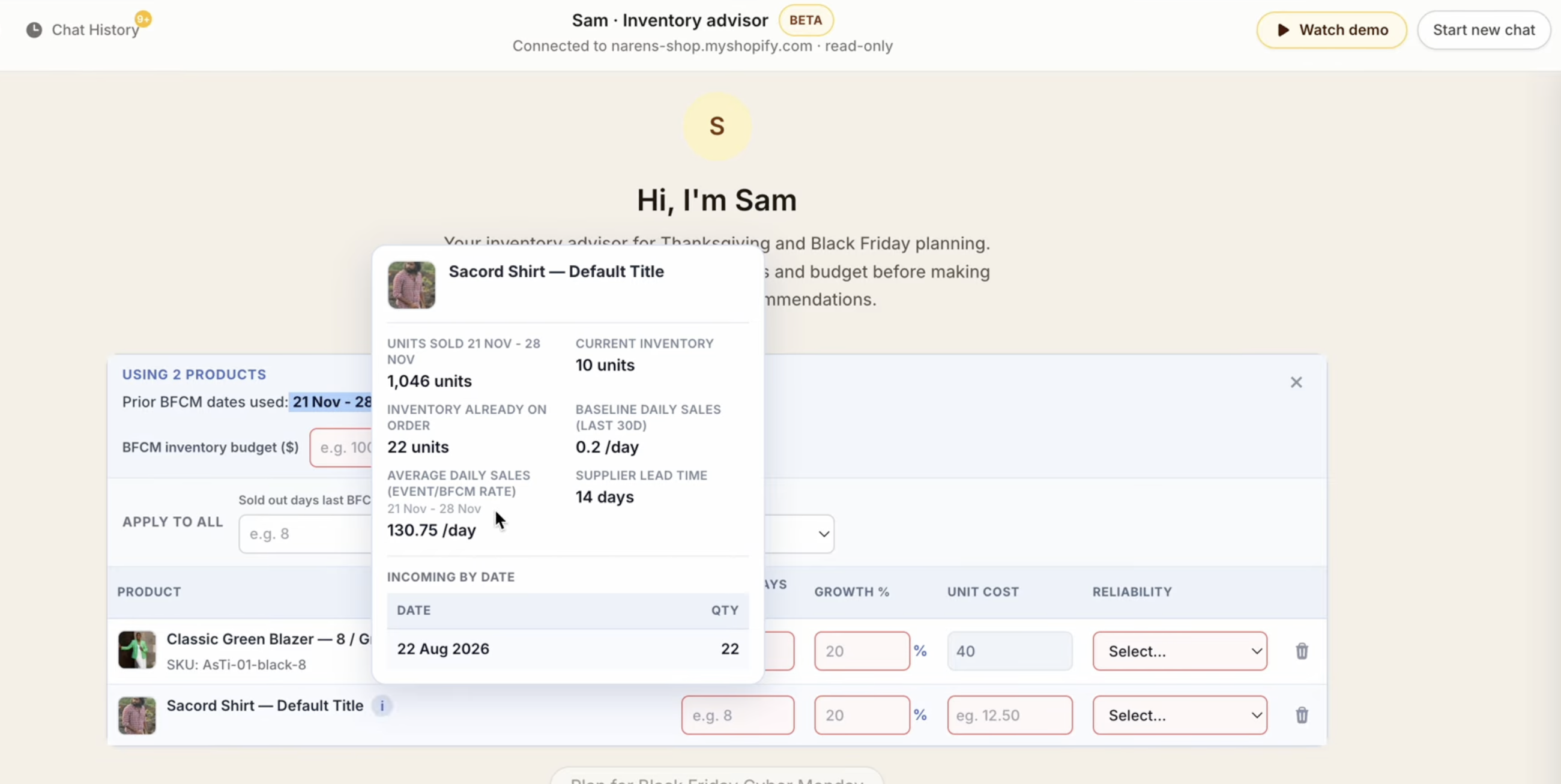
Step 3: Fill in this year’s expectations
This is where your judgment comes in. Sam asks you for the inputs only you know:
- Sold out days last BFCM — how many days was the product out of stock during the event? This is how Sam corrects for understated demand.
- Growth % — how much do you expect to grow this BFCM vs last year?
- Unit cost — so Sam can check your plan against your budget.
- Reliability — how reliable is your supplier? This affects how much buffer Sam builds in.
- BFCM inventory budget — your total spend cap across all products.
You can apply the same assumptions to all products at once, or set them individually.
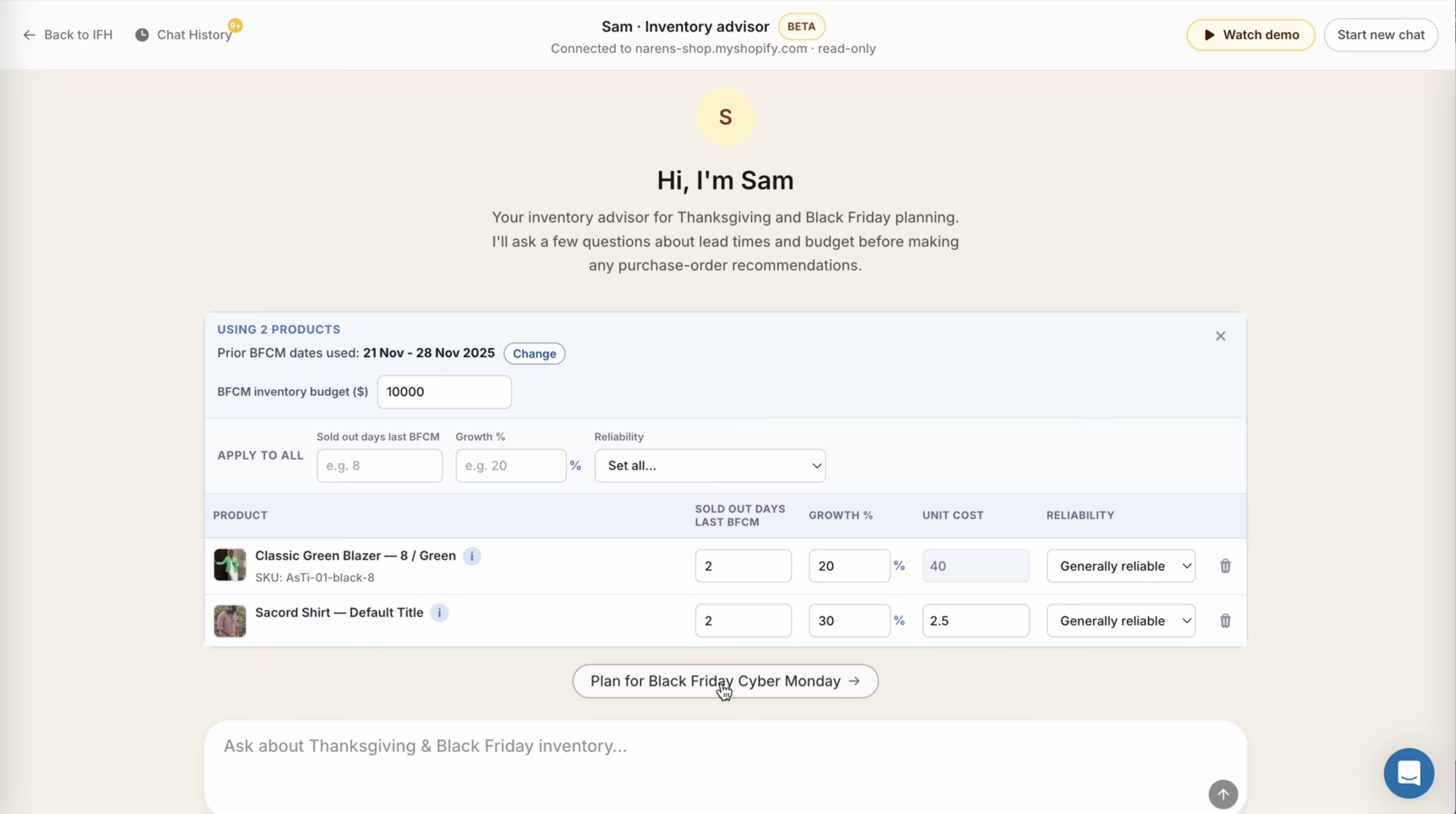
Step 4: Press “Plan for Black Friday Cyber Monday”
Once you’ve filled in your inputs, hit the button. Sam takes over.
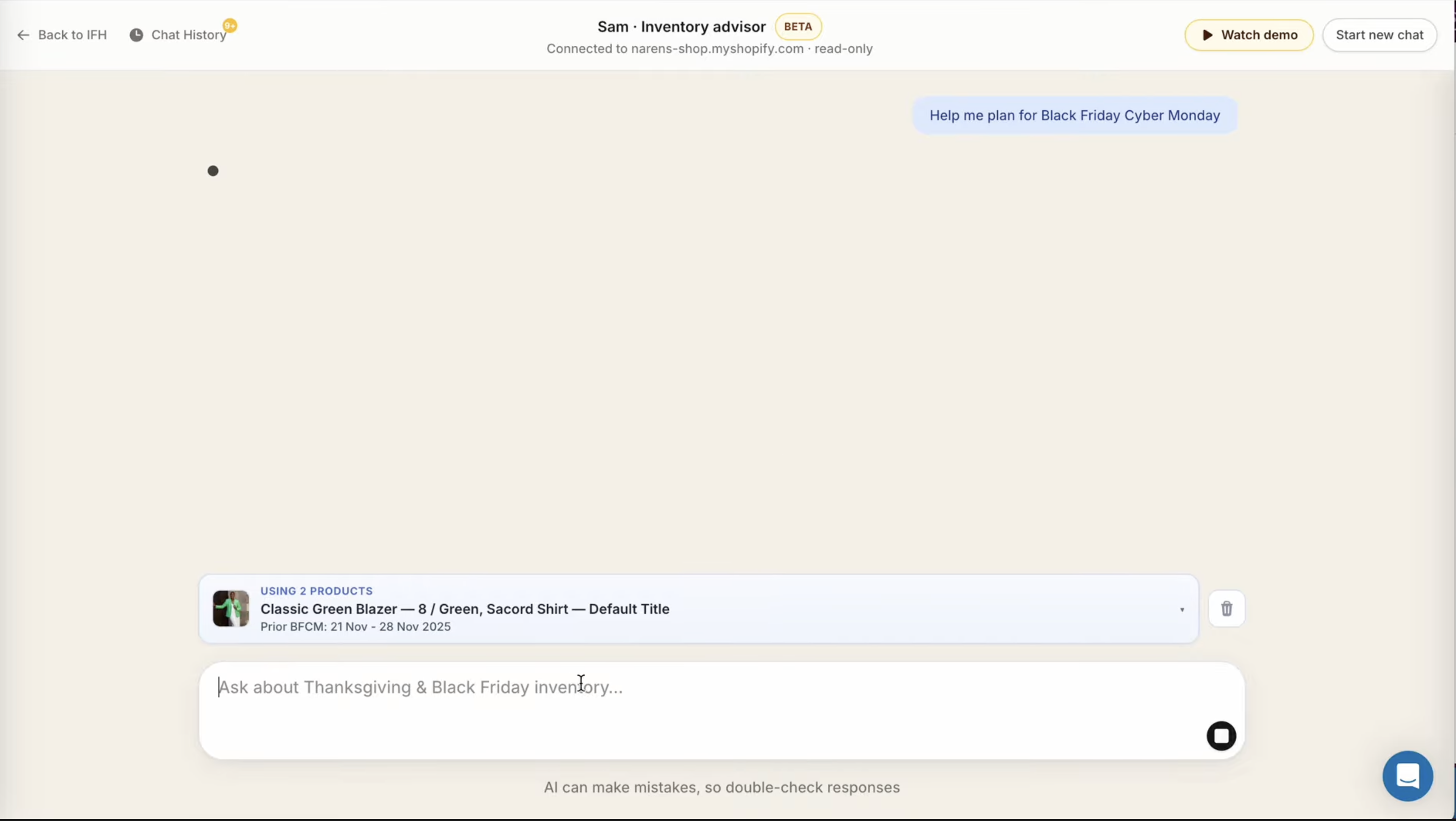
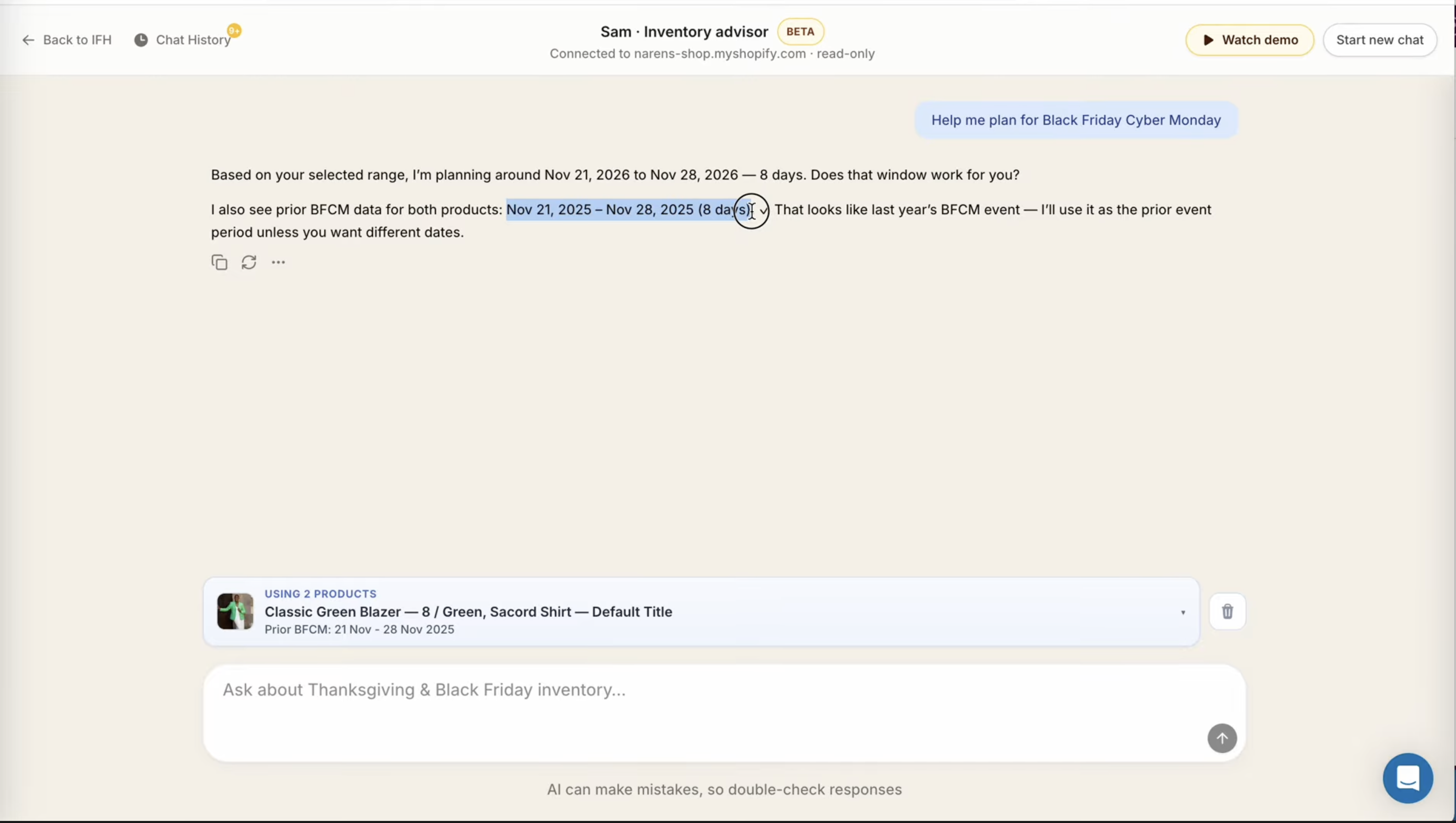
Step 5: Sam confirms the planning window
Sam uses last year’s BFCM date range as the default comparison period for this year. It’ll confirm the dates with you and you can change them if your BFCM window is different this year.
Step 6: Sam gives you a buy plan
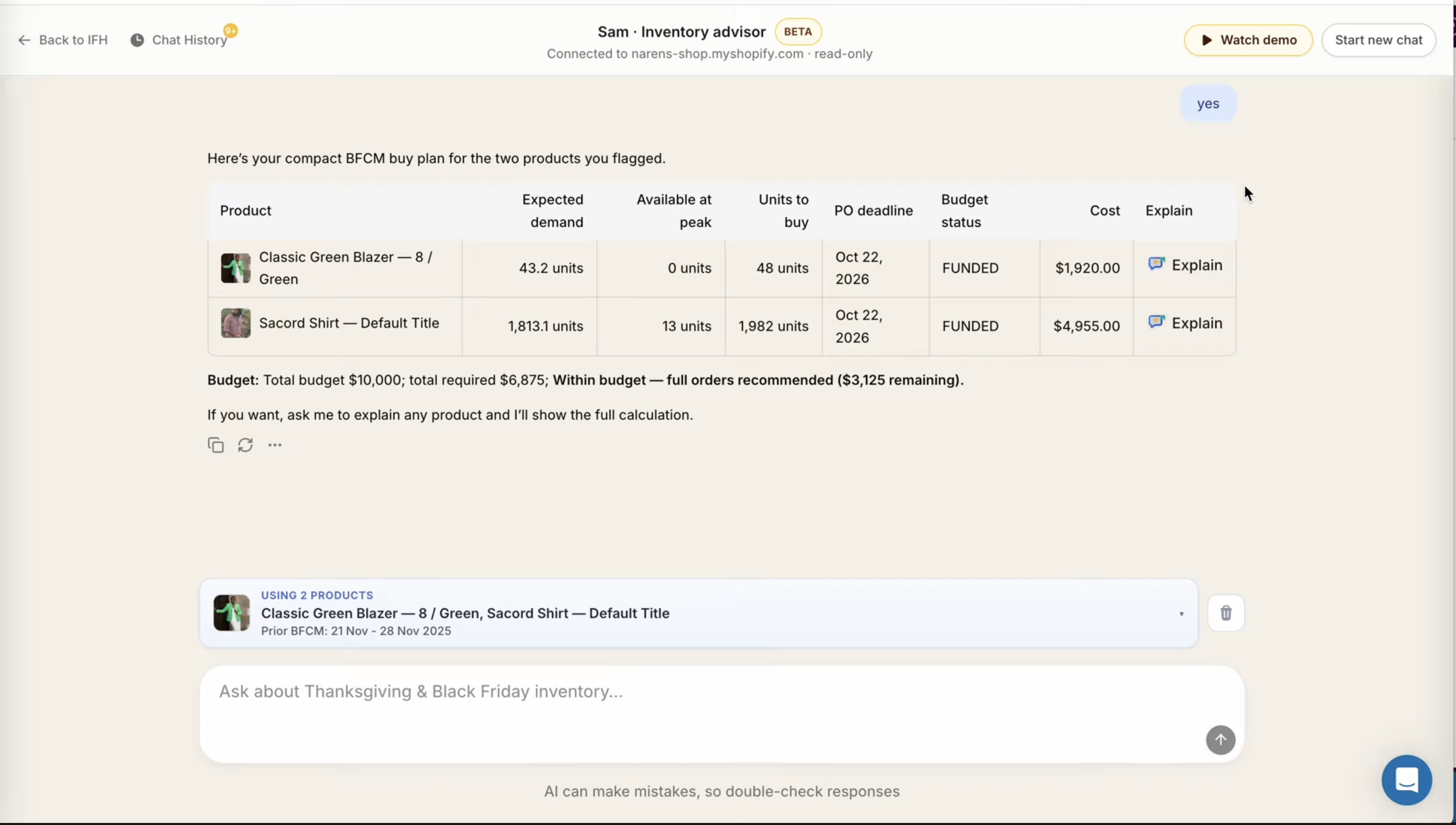
Sam outputs a table for every product you selected:
- Expected demand — what Sam forecasts you’ll sell during BFCM
- Available at peak — how much stock you’ll actually have when BFCM starts, after accounting for sales between now and then plus incoming inventory by arrival date
- Units to buy — how many to order
- PO deadline — the date you need to place the purchase order by, based on your lead time
- Budget status — whether the order fits within your budget
- Cost — the dollar amount
Step 7: Press “Explain” on any product to see the full working
This is the part we’re most proud of. Next to every product in the buy plan, there’s an Explain button. Press it and Sam walks you through the full calculation — step by step, in plain English.
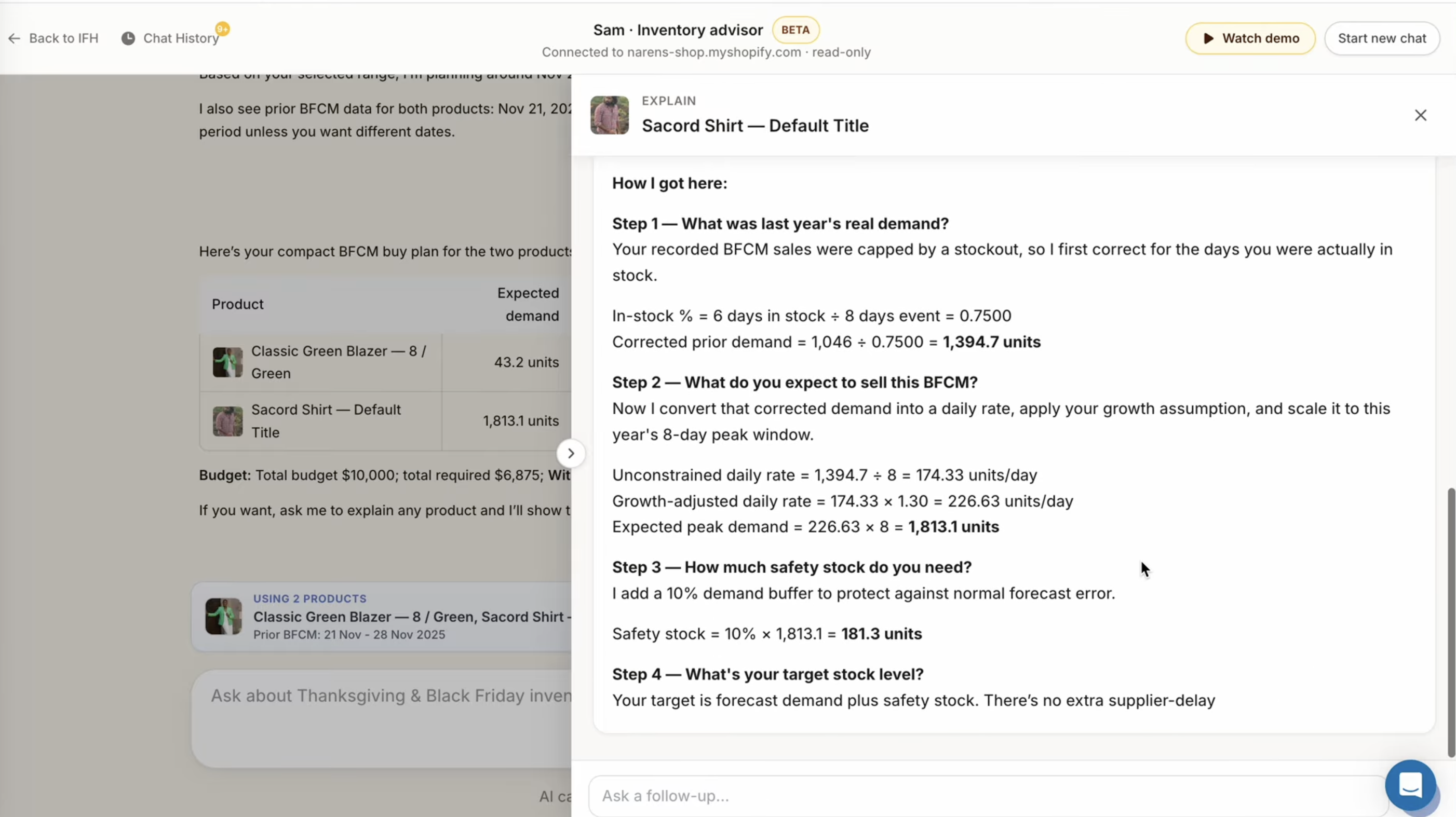
You’ll see:
- How Sam corrected for stockout days to get the real unconstrained demand from last year
- How the growth assumption was applied to get this year’s expected demand
- The safety stock buffer and why
- The target stock level at peak
- What could go wrong with the forecast
- A confidence rating and a clear call to action — exactly how many units to buy and by when
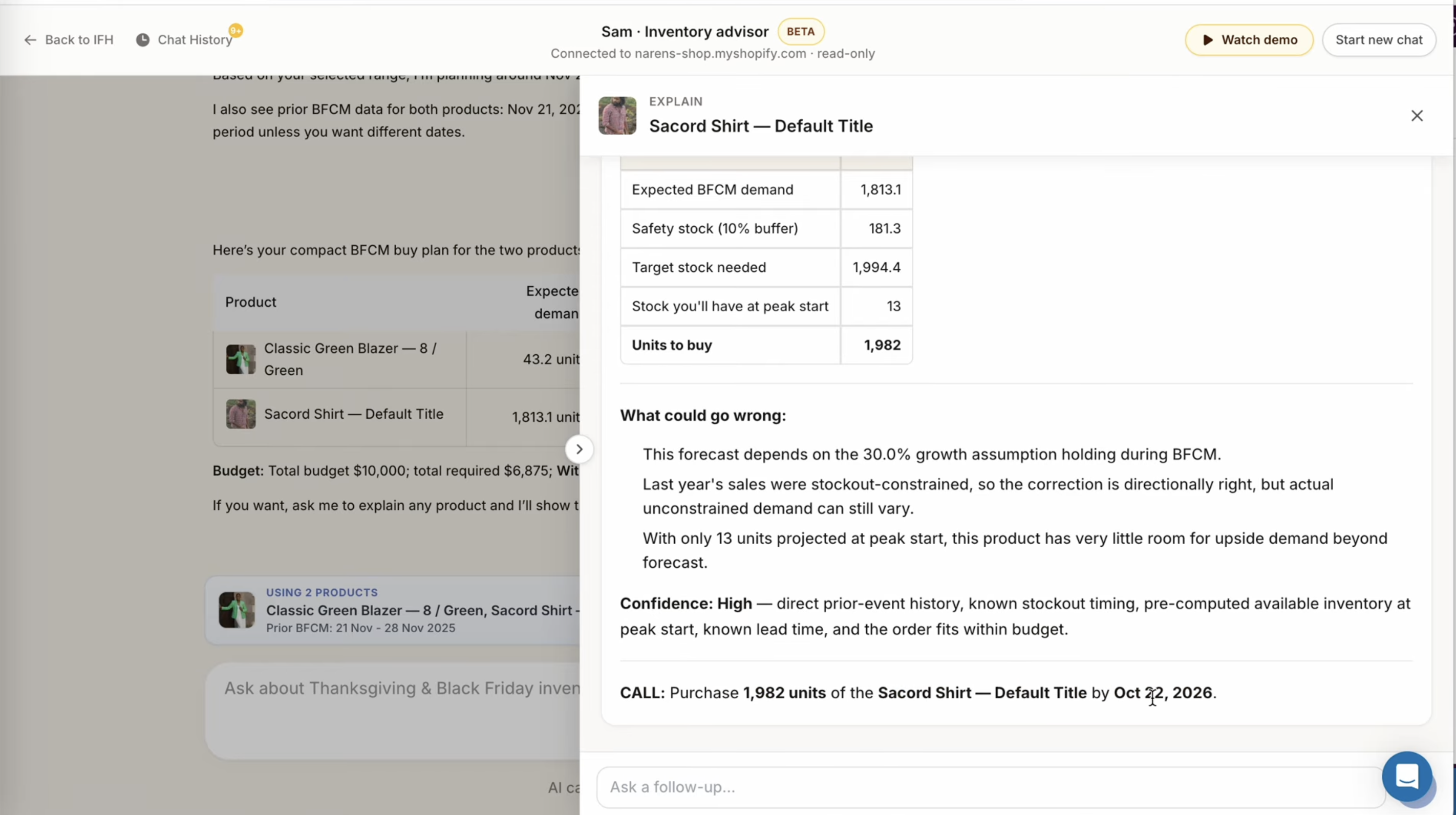
This is the part that replaces the Sunday night stress. You can see every assumption that went into the number. You can change an input and rerun it. You can ask Sam follow-up questions in the chat. You’re not just trusting a number — you understand where it came from.
What Sam Is and Isn’t
Sam is not a magic oracle. The footer says it plainly: “AI can make mistakes, so double-check responses.” Your judgment still matters — Sam just makes that judgment faster and better-informed.
What Sam is: an AI advisor built on real inventory planning methodology, connected to the data that actually matters for BFCM — stockout-corrected demand, lead times, incoming inventory by date, budget constraints. It’s the kind of structured thinking a trained planner brings, available to any merchant regardless of budget.
Sam is available now inside IFH: Inventory Forecasting Hero. If you’re already a merchant, you’ll find it in the app. If you’re not yet on IFH, this is a good time to start — BFCM planning needs to happen now, not in October.
If you want help getting set up or want to walk through your specific situation, reach out to the team. We’re still happy to get on calls.
FAQ
What is Sam in IFH: Inventory Forecasting Hero? Sam is an AI inventory advisor built into IFH: Inventory Forecasting Hero to help Shopify merchants plan their inventory for Black Friday and Cyber Monday. It uses last year’s BFCM sales data, corrects for stockout days, applies your growth assumptions, and outputs a buy plan with a PO deadline for each product.
How is Sam different from ChatGPT or Shopify Sidekick for BFCM planning? Generic AI tools don’t have access to supplier lead times, stockout-adjusted demand, or incoming inventory broken down by arrival date. Sam does — because it’s connected to your IFH data. It also follows a methodology built with a real inventory planner, not a general-purpose language model making its best guess.
Does Sam correct for stockout days during last BFCM? Yes. If a product ran out of stock on Day 3 of an 8-day BFCM event, Sam doesn’t treat that as “3 days of demand.” It corrects the number upward to estimate what would have sold if the product had stayed in stock — giving you a more accurate baseline for this year’s plan.
What inputs do I need to provide to Sam? You provide: how many days the product was out of stock during last BFCM, your expected growth percentage, unit cost, supplier reliability, and your total BFCM inventory budget. Sam pulls everything else — sales history, current inventory, incoming orders and their arrival dates, lead times — from your IFH and Shopify data.
Is Sam available in other languages? Yes. Sam is multilingual. You can chat with it in French, Spanish, or any other language and it will respond in kind.
When should I start BFCM inventory planning? Now. If your supplier lead time is 30–60 days, you need to place purchase orders by late September or early October at the latest to have stock in hand before BFCM. Sam will tell you your specific PO deadline based on your lead time settings.
Inventory Forecasting Hero does this automatically for your Shopify store. $25/month with a 30-day free trial.
Start Free Trial →